
What is Ecofit?
Asset Management
Ecofit is your all-in-one equipment management solution that allows you to keep track of all your fitness equipment for all of your locations in once place.
Data Analytics
Ecofit offers industry leading data analytics on all Connected equipment that allows you to make informed decisions and get the most out of your equipment.
How To Get Started
Create a new account.
If you are new to the Ecofit platform, start by creating a new account at assets.myecofit.com.
If you already have an account, you can log in normally.
Create a new organization.
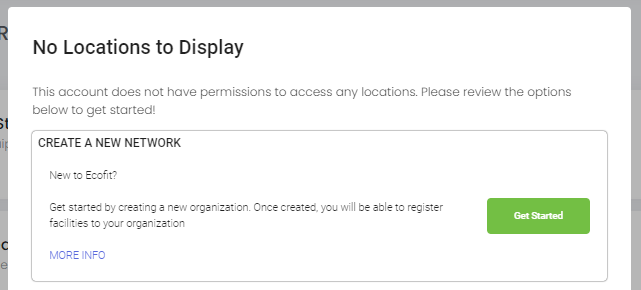
Upon creation of a new account you will encounter the getting started window. Select the "Get Started" button to create a new Organization.
What is an Organization?
An organization contains your billing information and links all of your facilities. All facilities need to be linked to an organization.
How to create a new Organization.
Create a new Organization by selecting the "Get Started" button. Complete the new organization form and select "confirm".
Once the organization has been created you will begin your 3 month trial. During this trial you can create unlimited locations and equipment entries. Upgrading equipment to Connected can be completed at any time at additional cost.
My company has already created an organization through Ecofit.
Contact your system administrator to be granted access to your organization.
Add a facility to an Organization.
From the network landing page, select the "Add Facility" Button.

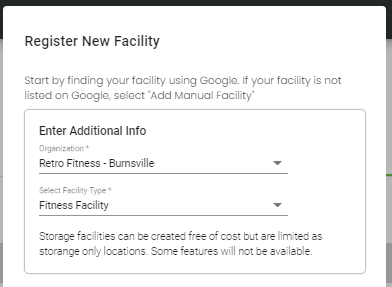
Select your organization from the dropdown then select your facility type.
Fitness Facility
This is a fully featured facility with access to all features. This is the default facility type and will incur standard billing once the trial is over.
Storage Facility
Storage facilities are locations with limited feature sets that are intended as equipment storage. Users can add and transfer equipment to storage facilities. Storage facilities do not incur a monthly cost.
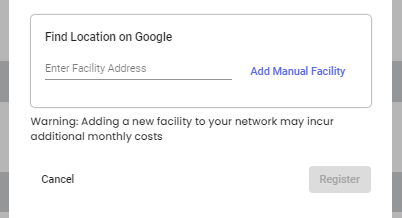
Find your facility address using google. If your location has not been added to google, then you can manually add your facility info by selecting "Manual Facility".
Add Equipment to a Facility.
Once a facility has been created equipment can be added. Do so by selecting the Actions dropdown.
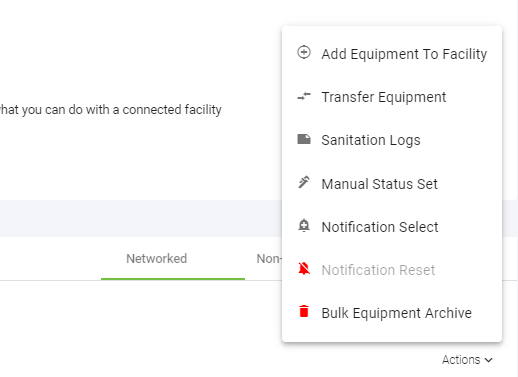
Select "Actions", then "Add Equipment to Facility". Complete the form and select "Register". To add another piece of equipment immediately after, select the "Add another" option after completing the form.
Comments
0 comments
Please sign in to leave a comment.